The terms get thrown around like they’re the same thing. They’re not. Here’s where they overlap, where they diverge, and why it matters for your business.
A business owner tells their agency: “We need better UI/UX.” The agency nods. Six weeks later, the website looks stunning. New colours, modern typography, polished icons, smooth animations. But conversions have not moved. Enquiries are flat. Bounce rate is the same.
What happened? The agency redesigned the interface (UI). Nobody touched the experience (UX). The checkout still takes six steps. The navigation still does not match how customers think. The information architecture still buries the most important content three clicks deep.
This scenario plays out constantly, and it starts with a single misunderstanding: treating UI and UX as the same thing.
They are not. They work together. They depend on each other. But they solve different problems, require different skills, and affect different parts of how a business performs online. Understanding the difference between UI and UX is not an academic exercise. It determines whether a design investment pays for itself or becomes an expensive coat of paint on a broken building.
The numbers are worth knowing upfront. Every $1 invested in UX returns up to $100, a 9,900% ROI, according to a famous study by Forrester Research. Good UI can boost conversions by 200%. Strong UX can boost them by up to 400%. Design-led companies outperformed the S&P 500 by 228% over a decade. These returns only materialise when both UI and UX are done well, and done as distinct, complementary disciplines.
What Is UX Design?
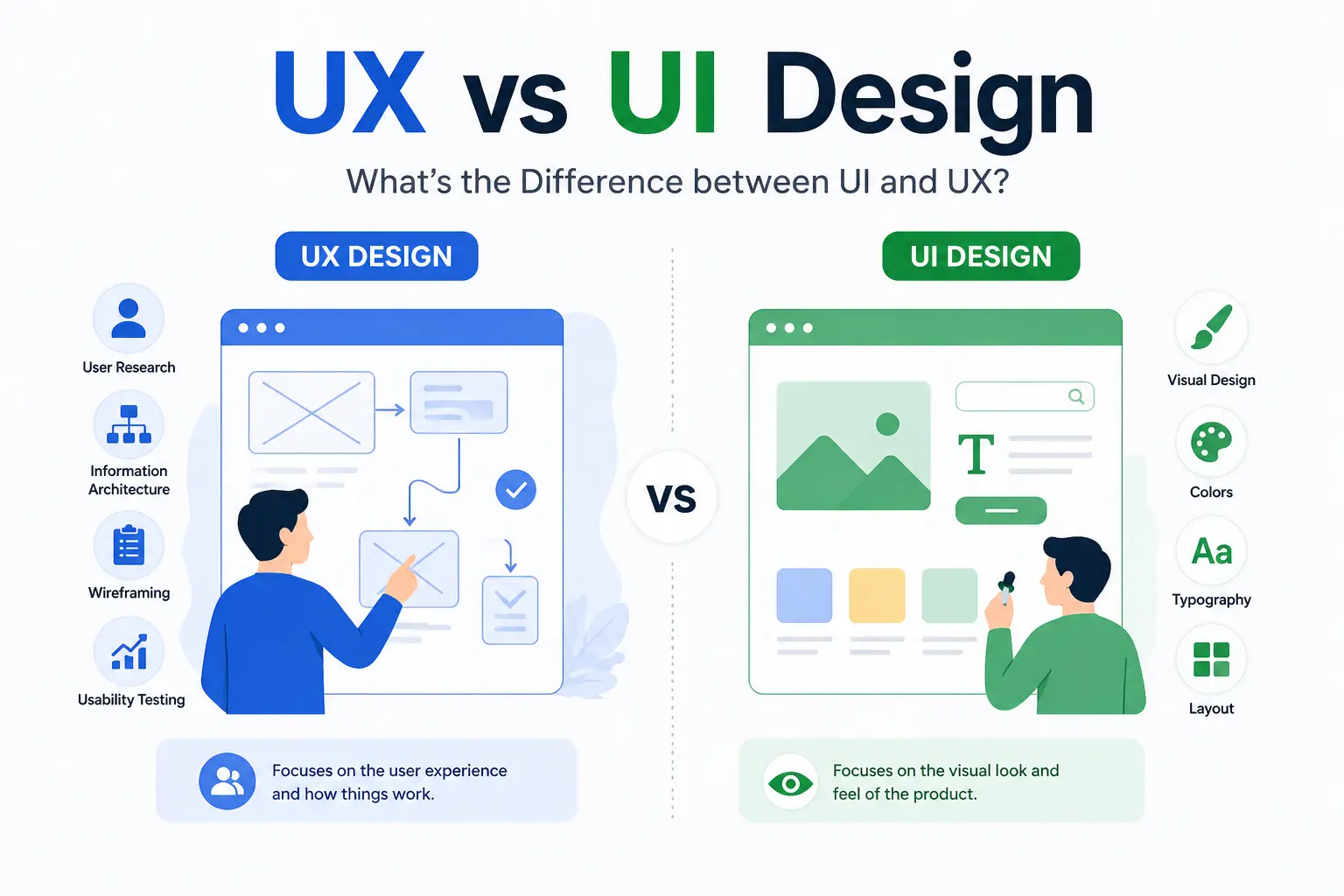
UX stands for User Experience. It covers the entire journey a person takes when using a product, whether that is a website, a mobile app, a software tool, or even a physical service. UX design is about making that journey smooth, logical, and satisfying.
When someone visits an e-commerce site, finds the product they want in under thirty seconds, adds it to cart, breezes through a two-step checkout, and feels confident throughout, that is good UX. When someone lands on the same site, cannot find the right category, gets confused by the filters, and abandons the cart because the shipping cost only appears at the final step, that is bad UX.
UX is invisible when it works. You only notice it when it fails.
What Does a UX Designer Actually Do?
UX design is research-driven and analytical. The process typically follows these stages:
1. Discovery and research
Understanding the business, the audience, and the problem. This involves user interviews, surveys, analytics review, and competitor analysis. The goal is to learn how real users think, behave, and make decisions.
2. Define and map
Creating user personas (profiles of typical users), mapping user journeys (the steps someone takes from first visit to conversion), and building information architecture (how content and pages are structured and connected).
3. Wireframing
Creating low-fidelity layouts that define the structure and flow of each page. Wireframes look like rough sketches. They are not about how things look. They are about how things are organised.
4. Prototyping
Building interactive, clickable versions of the wireframes that simulate the real experience. Users can test the prototype before any visual design or code is written.
5. Usability testing
Putting the prototype in front of real users and watching what happens. Where do they get stuck? What confuses them? What do they miss? The answers feed directly into design improvements.
6. Iteration
Refining based on test results. Then testing again. UX design is never truly finished. It improves continuously based on real user data.
What Makes UX Design Good?
Good UX has measurable characteristics:
- Users can accomplish their goal quickly and without confusion
- Navigation follows how people naturally think, not how the business is structured internally
- Friction points (unnecessary steps, unclear labels, hidden information) are identified and removed
- The experience works consistently across devices
- Every design decision connects to a user need or business goal
The business impact of getting this right is substantial. Staples.com saw a 500% increase in online revenue after a UX-focused redesign, says a report by Human Factors International. A major retailer generated $300 million in extra sales by changing a single button label from “Register” to “Continue”, according to Jared Spool, a UX Researcher. These are UX improvements, not visual changes.
What Is UI Design?
UI stands for User Interface. It covers the visual and interactive elements a user sees and touches: buttons, menus, typography, colours, icons, images, spacing, animations, and form fields. UI design makes the interface visually clear, attractive, consistent, and aligned with the brand.
If UX is the floor plan of a building, UI is the paint, the lighting, the furniture, and the finishes. Both matter. Neither works alone.
UI design applies exclusively to digital products. Unlike UX, which can cover non-digital experiences (how a restaurant seats you, how an airline handles boarding), UI is about screens.
What Does a UI Designer Actually Do?
UI design is visual and detail-oriented. The process involves:
1. Brand and visual research
Understanding the brand identity, visual tone, and the expectations of the target audience. A financial services site needs a different visual language than a streetwear brand.
2. Design system creation
Defining colour palettes, typography, spacing rules, button styles, icon sets, and component patterns. This system ensures every page and element feels consistent.
3. High-fidelity mockups
Designing detailed, pixel-perfect screens that show exactly what the finished product will look like. These are the screens developers will build.
4. Interaction design
Defining how elements behave when users interact with them: hover states, animations, transitions, loading indicators, and micro-interactions that make the interface feel responsive and alive.
5. Developer handoff
Preparing specifications, assets, and documentation to enable developers to implement the designs accurately.
What Makes UI Design Good?
| Quality | What It Means in Practice |
| Visual clarity | Users instantly understand what each element does and where to look first |
| Consistency | Buttons, fonts, colours, and spacing follow a coherent system across every page |
| Hierarchy | The most important elements draw attention first through size, colour, and placement |
| Responsiveness | The interface looks and works well across phones, tablets, and desktops |
| Brand alignment | The visual design reflects the brand’s personality, tone, and values |
| Accessibility | Colour contrast, text sizes, and interactive elements work for users with disabilities |
38% of users assess layout and navigational structure first when visiting a website. 94% of first impressions are design-related. If the interface does not look trustworthy, users leave before the UX can make any impression at all.
What Is the Real Difference Between UI and UX?
This is the section that clarifies the core question: what is UI and UX, and how do they differ?
The Full Comparison
| Dimension | UX Design | UI Design |
| Focus | The overall experience and how the product feels to use | The visual layer and how the interface looks and responds |
| Scope | Can apply to any product or service (digital, physical, hybrid) | Applies exclusively to digital products |
| Core question | Is this useful, usable, and satisfying? | Is this visually clear, attractive, and consistent? |
| Research | User behaviour, testing, analytics, journey mapping | Visual trends, brand guidelines, design patterns |
| Deliverables | Wireframes, user flows, personas, prototypes, test results | Mockups, design systems, style guides, visual assets |
| Process start | Understanding the user and the problem | Understanding the brand and the visual language |
| Analogy | The floor plan and layout of a restaurant | The decor, lighting, table settings, and plating |
| Measures success by | Task completion, time on task, satisfaction, conversion | Visual consistency, brand alignment, interaction quality |
| Key skills | Empathy, research, information architecture, testing | Colour theory, typography, layout, visual hierarchy |
| Mindset | Analytical and problem-solving | Creative and visual |
The Restaurant Analogy
This comparison appears in most top guides for good reason. It makes the distinction immediately clear.
UX is the entire dining experience. How you are greeted at the door. How the menu is structured. How long you wait for food. How easy it is to flag the waiter. How the bill is handled. Whether you would come back.
UI is the plating of the food. How the dish looks on the plate. The colours, the arrangement, the garnish. Whether the presentation makes you want to take the first bite.
Beautiful plating cannot save a bad meal. A great meal served on a paper plate loses some of its appeal. You need both.
Where Do UI and UX Overlap?
The overlap happens in interaction design: how elements behave when users interact with them. A button’s placement is a UX decision (where should it sit in the user’s journey?). Its colour, size, and animation are UI decisions (how does it look and feel to click?). Both affect whether the user takes the action the business wants them to take.
In practice, UX defines the structure and flow. UI brings it to life visually. Changes in one often require adjustments in the other. The two disciplines work in sequence (UX typically leads) and in constant collaboration.
Why Do Businesses Need Both?
What Happens When UI Is Strong but UX Is Weak?
The site looks polished. Colours are on brand. Typography is sharp. Animations are smooth. But the visitor cannot find what they need. The navigation categories do not match their mental model. The checkout requires an account creation before they can buy. The contact form asks for twelve fields when three would do.
Result: the site looks like it should work. It does not. Visitors leave confused and frustrated, and they may not even be able to articulate why. They just know it “felt hard.”
Reference: According to Amazon Web Services (AWS) research, poor user experience (UX) causes businesses to lose approximately 35% of potential sales. 70% of online customers abandon a purchase because of bad user experience (cited by multiple sources).
What Happens When UX Is Strong but UI Is Weak?
The site is logical. Navigation makes sense. Checkout is smooth. Everything works. But the design looks dated, cluttered, or visually inconsistent. Fonts do not match. Colours feel random. The overall impression is unprofessional.
Result: users do not trust the brand enough to engage. They scroll past. They click back to Google and choose a competitor whose site looks more credible.
Reference: 94% of first impressions are design-related. 75% of consumers judge a company’s credibility based on website design. If the UI does not earn trust visually, the UX never gets a chance.
What Happens When Both Work Together?
| Business Metric | Impact |
| Conversion rates | UI improvements boost by 200%; UX improvements boost by up to 400% (Forrester) |
| ROI | $1 invested in UX returns up to $100 (Forrester) |
| Revenue growth | Design-led firms grow revenue 32% faster (McKinsey) |
| Shareholder returns | Design-led companies outperform S&P 500 by 228% over 10 years (McKinsey) |
| Willingness to pay more | 80% of consumers will pay more for a better experience (PwC) |
| Checkout conversions | Fixing checkout UX lifts conversions by 35.26% (Baymard) |
| Budget efficiency | A 10% increase in UX budget drives up to 83% more conversions (Forrester) |
| Cost of neglect | Poor UX costs 10x more to fix later than investing properly from the start |
How Does UI/UX Affect SEO and Digital Performance?
Does Google Care About UI and UX?
Yes. Directly.
Core Web Vitals (LCP, INP, CLS) are ranking factors. These are, at their core, UI/UX metrics: how fast the visible content loads, how quickly the page responds to interaction, and how stable the layout stays while loading.
Mobile-friendliness is a ranking factor. A site that does not work well on phones (a UI/UX problem) is penalised in mobile search results. Over 60% of web traffic in India comes from mobile devices. Mobile users are 5x more likely to abandon a task if the site is not optimised for their device.
Engagement signals (bounce rate, time on page, pages per session) correlate with search rankings. These signals improve when UX reduces friction and UI keeps users visually engaged.
How Does UI/UX Connect to AI Search Visibility?
AI Overviews, ChatGPT-powered search, and voice assistants surface content from sites they trust. Trust is influenced by clear information architecture (UX), fast performance (both), accessibility (both), and structured data implementation.
A well-designed website that is easy for both humans and machines to navigate performs better in traditional search and AI-driven discovery. AEO (Answer Engine Optimisation) principles (clear headings, direct answers, schema markup) align naturally with good UX vs UI design practices.
How Does the UI/UX Process Actually Work?
Rather than describing these as separate workflows (which can make them seem disconnected), here is how a strong UI UX design services process typically unfolds as an integrated sequence.
The Integrated Process
| Stage | UX Activity | UI Activity | Outcome |
| 1. Discovery | User research, stakeholder interviews, analytics review | Brand analysis, visual audit, competitor visual research | Shared understanding of users, business goals, and visual direction |
| 2. Define | User personas, journey maps, success metrics | Visual mood boards, initial style direction | Documented audience needs and brand tone |
| 3. Structure | Information architecture, content hierarchy, site map | N/A (waiting for structure) | Logical framework for the entire site |
| 4. Wireframe | Low-fidelity page layouts defining structure and flow | Review wireframes for visual feasibility | Approved page structures before visual design begins |
| 5. Visual design | Review UI mockups against user needs and flows | High-fidelity mockups, design system, component library | Polished screens that look right and work right |
| 6. Interaction | Define functional requirements for interactive elements | Design animations, transitions, hover states, micro-interactions | Interfaces that feel responsive and alive |
| 7. Prototype and test | Run usability tests with real users | Refine visuals based on test feedback | Validated design ready for development |
| 8. Build and launch | QA testing against user flows and conversion goals | QA against visual specifications and responsiveness | Live product that meets both UX and UI standards |
| 9. Measure and iterate | Analyse user behaviour, conversion data, heatmaps | Refine visual elements based on performance data | Continuous improvement based on real results |
This is not always linear. Steps overlap. UX and UI teams check in regularly. But the sequence shows how UX decisions inform UI decisions, and how both feed into a product that works and looks the way it should.
How Should You Evaluate UI UX Design Services?
When choosing a partner for UI UX design services, the distinction between UI and UX should shape how you evaluate proposals and assess capability.
What to Look For
| Quality | What It Tells You |
| Research-led process | The agency starts with user research and business goals, not a template or visual concept |
| Separate UX and UI capabilities | They have strategists/researchers and visual designers, not one person doing everything superficially |
| Portfolio with outcomes | Projects show measurable results (conversion lifts, usability improvements), not just attractive screenshots |
| Testing as standard | Usability testing is part of the process, not an optional add-on |
| Post-launch measurement | They track performance after launch and iterate, rather than handing off and walking away |
| Accessibility built in | Accessible design is part of the system from the start, not an afterthought |
What the Best UI UX Design Companies Get Right
The best UI UX design companies treat UI and UX as distinct disciplines with a shared objective. They do not skip research to rush into visual design. They do not present mockups before understanding the user. And they do not measure success by how the portfolio looks. They measure it by what the design achieves for the business.
WebAIM’s 2026 Million report found that 95.9% of the top 1 million home pages had detected WCAG failures, suggesting full WCAG A/AA conformance is below 4.1%. The agencies that build accessibility into their design systems from day one, rather than retrofitting later, are the ones delivering genuinely future-proof work.
UI/UX Trends Shaping 2026
AI in UI/UX Design
AI-powered tools (Figma AI, Galileo, Uizard) now generate initial UI layouts from text prompts. AI-driven analytics help UX teams identify friction points through automated behaviour analysis. AI personalisation allows interfaces to adapt to individual user behaviour in real time.
According to Deloitte, 85% of companies increased spending on AI and digital experience programmes in 2025, and 91% plan to expand in 2026. The role of human designers is shifting from production to strategy, creative direction, and ensuring AI-generated outputs actually meet user needs.
Accessibility as Standard
Accessible design improves usability for everyone. High-contrast text, keyboard navigation, proper heading structures, and readable typography are not accommodations. They are good design. The best UI UX design companies now embed accessibility into their design systems from the start.
Performance as a Design Discipline
Core Web Vitals have made performance a design responsibility, not just a development one. Designers who understand how their choices affect load time, layout stability, and interaction responsiveness produce work that ranks better and converts more.
UI and UX Are Different Disciplines That Create One Outcome
UX design shapes the overall experience: how a product works, how easily users achieve their goals, and how the journey feels from start to finish. UI design shapes the visual and interactive layer: what users see, how elements look, and how the interface communicates the brand.
The difference between UI and UX is the difference between the floor plan and the finishes. Both are essential. Neither works alone. Businesses that invest in both consistently outperform those that treat design as a purely visual exercise.
Good UI earns attention. Good UX earns conversions, retention, and loyalty. Together, they create digital experiences that build trust between a brand and its audience. And trust is what turns visitors into customers and customers into advocates.
How We Approach UI/UX at Savit
At Savit, we see UI/UX design as communication between the brand and the user. The interface is the language. The experience is the conversation. When both are designed well, the user understands the brand, trusts it, and takes action. When either falls short, the conversation breaks down.
That perspective shapes everything about how our UI UX design services work. We start with the user and the business, not with a visual concept. We research how the audience thinks, browses, and decides. We map the journey from first visit to conversion. We define the structure and flow before a single colour is chosen. Then we design the interface to support that journey at every step: visually clear, on-brand, responsive, and built for the device the user is actually holding.
The better the UI/UX, the better the experience. The better the experience, the more likely a one-time visitor becomes a regular customer. That connection between design and revenue is what drives every project we take on.
Our website design services in Mumbai bring both strategic UX thinking and detailed UI execution to every engagement. Whether the project is a corporate website, an e-commerce platform, or a digital product interface, our team designs for business outcomes. We analyse existing performance, identify where users drop off and why, then build solutions that address the real problems, not just the visible ones.
As one of the best UI UX design companies in India, we combine research-led UX process with polished UI craft, and we measure success by what the design achieves: more conversions, lower bounce rates, stronger engagement, and a digital presence that earns trust from the first interaction.
Talk to Savit about UI/UX design that turns visitors into customers.